About LAUNCH X431 PRO SE
Launch X431 PRO SE Professional Car & LCV Diagnostic Tool with ECU Coding
Elevate Your Workshop Efficiency with OE-Level Diagnostics
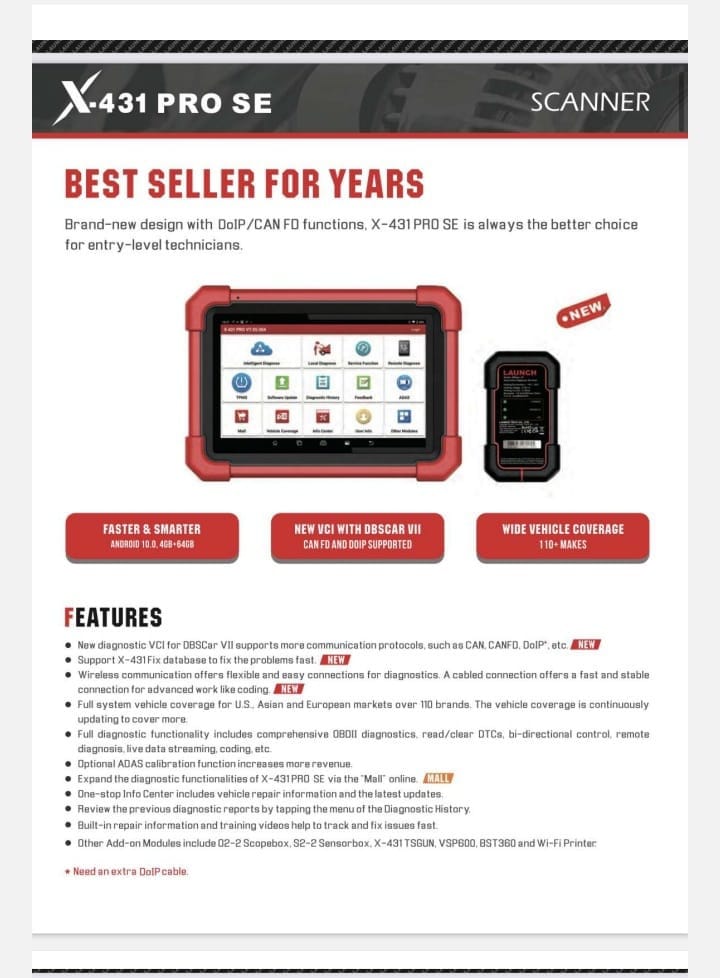
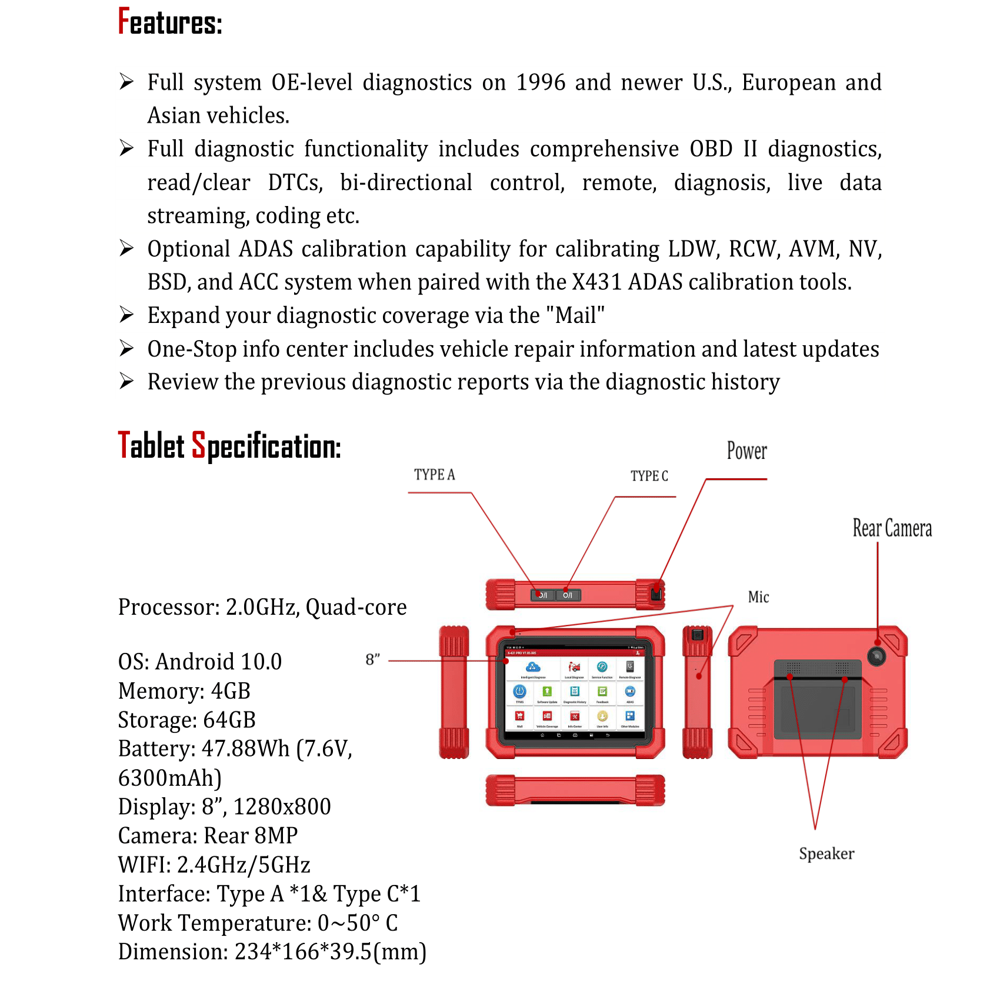
The Launch X431 PRO SE is a high-end, professional car diagnostic tool designed for multi-car automobile workshops, tyre shops, and truck garages. Combining a lightning-fast 2.0GHz quad-core processor with a rugged Android 10.0 tablet, this scanner is built to handle the demanding workflow of modern service centers.
Why the Launch X431 PRO SE is the Best Choice for Your Garage:
- Complete System Diagnosis & Advanced ECU Coding: Access every on-board systemincluding Engine, ABS, SRS, and Transmissionwith dealership-level depth. Its powerful ECU Coding capability allows you to match, learn, and code newly replaced modules, unlocking hidden vehicle features and personalizing performance settings.
- Comprehensive Coverage for Cars & LCVs: Whether you are servicing a compact sedan or a Light Commercial Vehicle (LCV), this tool has you covered. With support for over 150+ global brands and the latest CAN FD and DoIP protocols, it ensures compatibility with the newest vehicle models through 2025 and 2026.
- Lifetime Free Software Updates: Maximize your return on investment with Lifetime Free Updates via Wi-Fi. Never worry about recurring subscription fees; your tool will always stay current with the latest diagnostic software and vehicle models.
Key Technical Specifications:
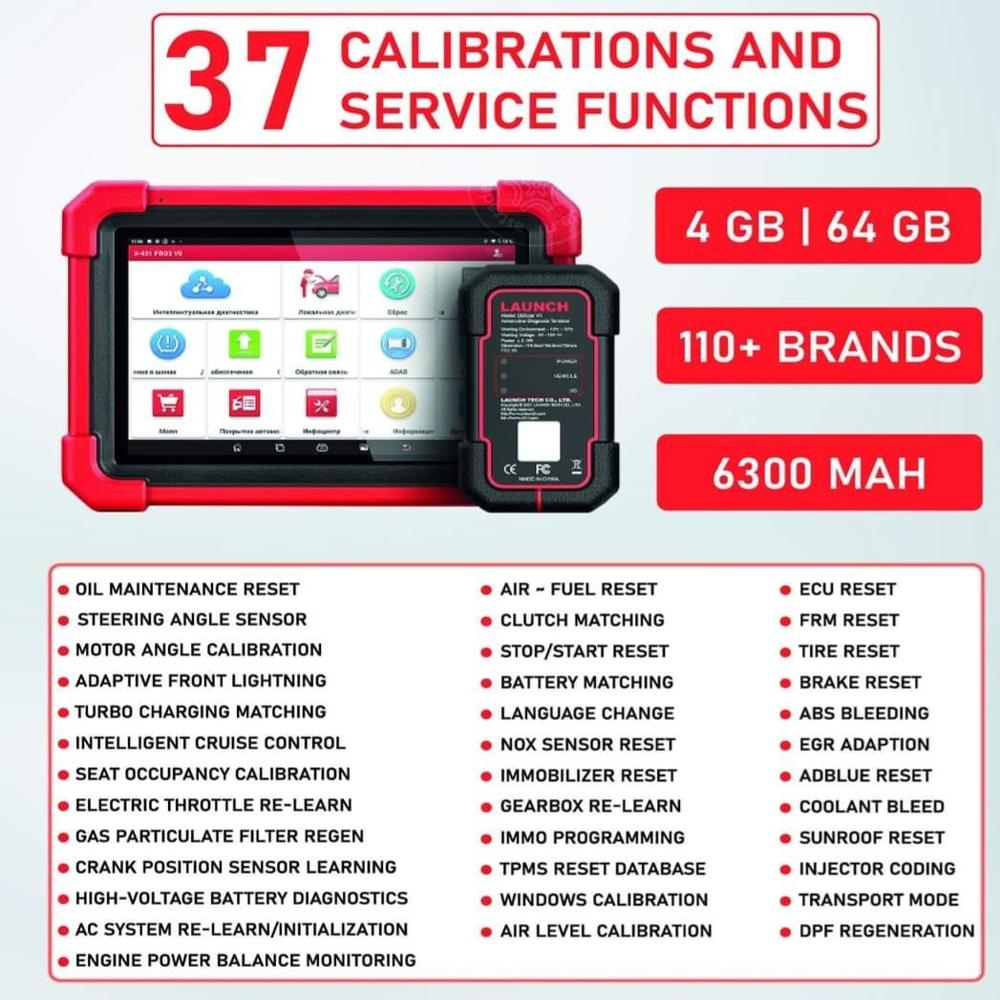
- Superior Hardware: 8-inch high-resolution touchscreen, 4GB RAM, and 64GB internal storage for glitch-free operation.
- Extended Battery Life: Equipped with a 6300mAh rechargeable battery, providing over 15 hours of continuous workshop use.
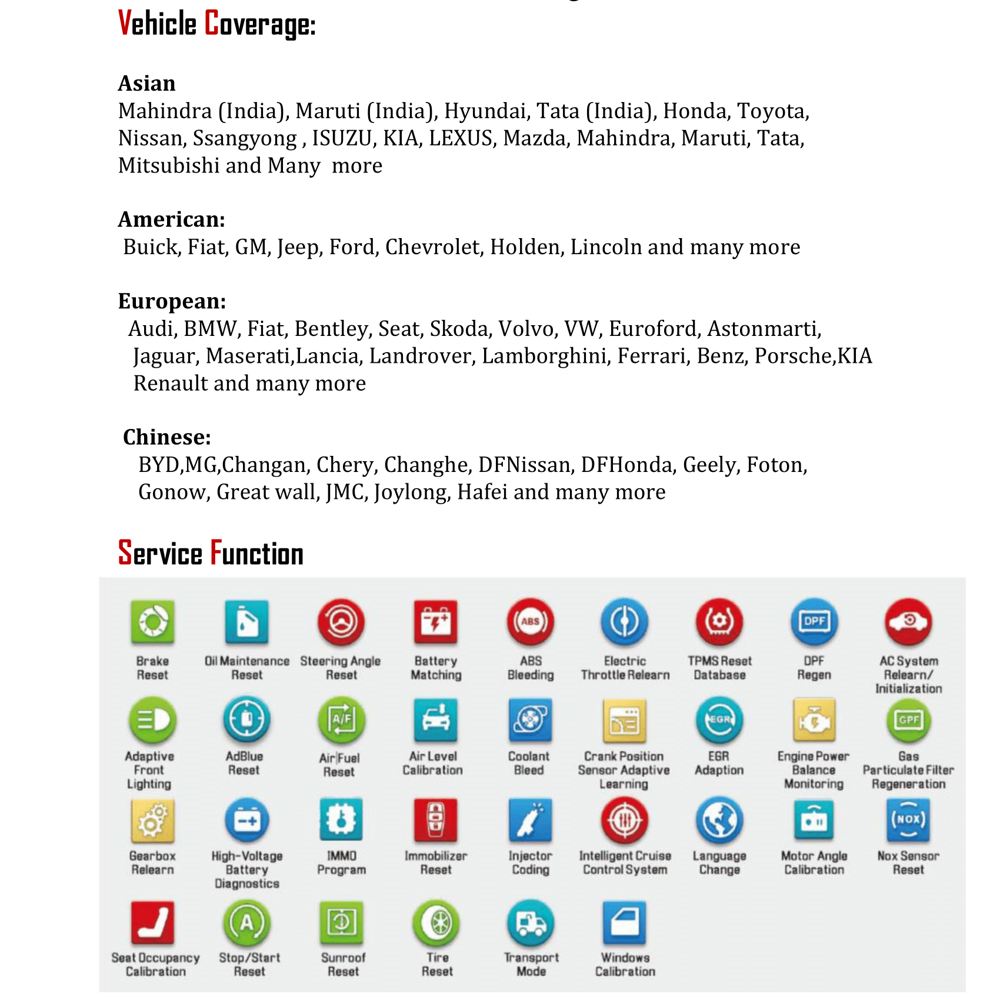
- 37+ Professional Service Functions: Includes Oil Reset, Injector Coding, ABS Bleeding, DPF Regeneration, and Battery Matching to handle 99% of daily repair needs.
- Bi-Directional Control (Active Test): Send commands directly to vehicle subsystems to test components like fuel pumps or radiator fans without manual labor.
Built for Professionals, Ready for the Future.
The Launch X431 PRO SE isn't just a code reader; it's an all-in-one diagnostic ecosystem. From automated Auto VIN recognition to intelligent topology mapping, every feature is designed to help you diagnose faster and increase your workshops profitability.
Upgrade your toolkit with the ultimate professional car diagnostic tool. Order the Launch X431 PRO SE today!
Cutting-Edge Diagnostics in Your HandsThe LAUNCH X431 PRO SE delivers swift and accurate diagnostics powered by a four-core processor and 7-inch high-definition touchscreen. Enhance workshop efficiency with real-time diagnostics, advanced coding, and ECU programming-ideal for tackling a wide spectrum of automotive service needs.
Seamless User ExperienceOperating on Android 9.0, the device features an intuitive interface, making navigation between diagnostic functions simple and quick. The physical buttons and touchscreen combination suit diverse user preferences, while online software updates ensure your tool always stays current.
Versatile Compatibility and ConnectivityWith extensive protocol support (OBDII/EOBD/JOBD) and a range of connection options including WiFi, Bluetooth, and USB Type-C, this tool works with most OBDII-compliant vehicles. Its built-in support for printers allows for instant diagnostic report printing, streamlining documentation.
FAQ's of LAUNCH X431 PRO SE:
Q: How do I update the software on my LAUNCH X431 PRO SE?
A: You can update the software directly from the device using its built-in WiFi connection. Simply navigate to the update section within the interface and follow the prompts for an online software update to ensure you have access to the latest diagnostic features.
Q: What types of vehicles are compatible with the LAUNCH X431 PRO SE?
A: The LAUNCH X431 PRO SE is designed to work with most OBDII-compliant vehicles. It supports full OBDII/EOBD/JOBD protocols, enhancing its versatility across both domestic and imported models.
Q: When should I use the reset, coding, or ECU programming features?
A: These advanced functions are utilized during regular vehicle maintenance, after part replacement, or when resolving system errors. Reset is often used for service intervals, coding for adapting new parts, and ECU programming for factory-level module updates.
Q: Where can I connect additional accessories, such as a printer?
A: You can connect accessories, like a printer, via the USB Type-C port or through supported wireless options, depending on your printer model. The device supports printing diagnostic results for easy recordkeeping and client communication.
Q: What is the process for diagnosing a vehicle using the X431 PRO SE?
A: To diagnose a vehicle, connect the device to the car's OBDII port, power it on, and access the appropriate diagnostic menu. Follow the on-screen instructions to run diagnostic tests, view live data, perform resets, or conduct coding and programming as required.
Q: How does the LAUNCH X431 PRO SE benefit automotive workshops or technicians?
A: This tool streamlines diagnostics with its speedy processor and versatile functions, reducing turnaround time and improving accuracy in troubleshooting. Its comprehensive compatibility and regular updates enable technicians to handle a wide range of vehicle issues in one device.

 Send Inquiry



 Send Inquiry

 Send Inquiry


 English
 Spanish
 French
 German
 Italian
 Chinese (Simplified)
 Japanese
 Korean
 Arabic
 Portuguese